FRM015A - Getting Started with Forms Programming Part A
In this step you will create a Form and open it in the LANSA editor.
1. On the File menu, use the New button and select Form / Basic Form.
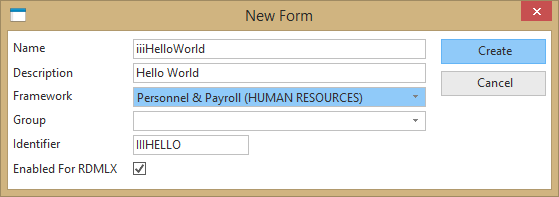
The Create form dialog is displayed.
Enter the following for the form:
a. Name: iiiHelloWorld (where iii=your initials) *
b. Description: Hello World
c. Framework : Personnel & Payroll
d. Enable for RDMLX (Yes)
* If you are using a trial version of LANSA, use iii=DEM (DEMCOM01). If the form already exists, it needs to be deleted first.
e. Click the Create button.
When you create a component you should select a suitable Framework, such as Personnel & Payroll (HUMAN RESOURCES). Frameworks organise components into groups and one way to find a components on the Repository tab, is to look under Organizers / Frameworks / HUMAN RESOURCES. You can change a component's Framework property at a later stage.
2. The form will open in the editor.