|
Name |
iiiAddEmploy |
|
Description |
Add Employee |
|
Enabled for RDMLX? |
|

FRM025 - Insert a Database Record
1. On the File menu, use the New button to create a Basic Form defined as follows:
|
Note: When creating a form you should select a specific Framework, such as Personnel & Payroll. Frameworks allow you to organize components (forms, reusable parts, web pages, server modules and WAMs) into logical groups. Your own Visual LANSA development work should use Frameworks which you define at the LANSA partition level on the IBM i server. The components Repository Details tab enables an alternative Framework to be selected if required.
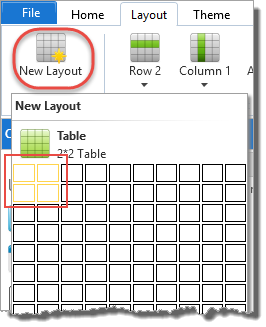
2. From the Layout ribbon, add a Layout Manager with 2 rows and 2 columns:
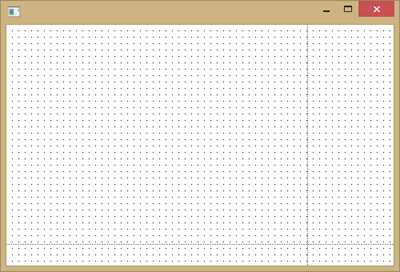
3. Adjust the row and column dividers so that your form look like the following:
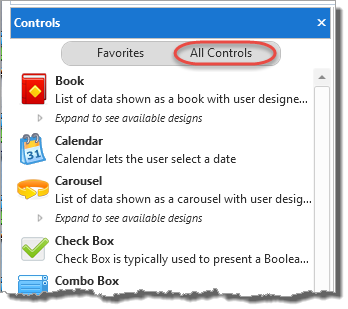
4. In the Design view, select the Controls tab and select All Controls:
5. Drag and drop a Status Bar component onto the bottom row.
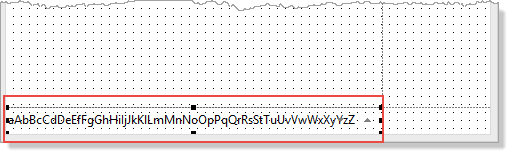
6. Select the Details tab and set the Status Bar's AutoLayout property to True:
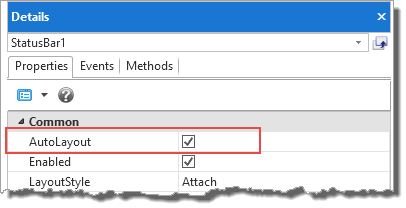
The Status Bar will occupy the width of the form and attach to the form's lower edge.