FRM035 - Maintain a Simple Database Table
In this step you will create a simple form to fetch a record from the Department file.
In the later steps, you will add insert, update and delete operations to this form to build a complete maintenance application.
1. Create a New / Basic Form
Named : iiiMntDept
Description: Database Access
Framework: Personnel & Payroll
RDMLX Enabled
Where iii are your course assigned initials. If you are using iii=DEM, your component must be named DEMCOM03.
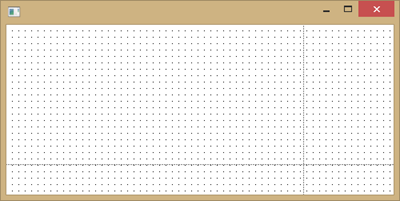
2. Using the Layout ribbon add a Layout Manager with 2 rows and 2 columns. Adjust the dividers so that your from looks like the following:
3. Using the Repository tab, locate the DEPTAB file. Notice that the file has two fields DEPTMENT and DEPTDESC. The file is keyed on DEPTMENT.
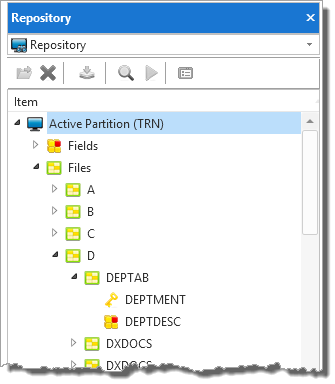
4. Drag and drop the DEPTMENT and DEPTDESC fields on to row 1, column 1.
5. Give both fields a margin Top of 10 and a margin Left of 20.
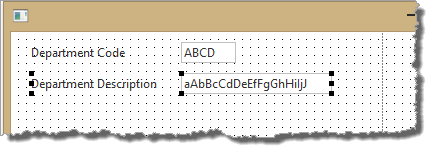
6. Adjust the width of each field. Your form should look like the following:
7. Add a Status Bar to the second row, column 1 so that validation error messages can be displayed.
Change the Status Bar AutoLocate property to True. The Status Bar will occupy the width of the form and attach to the lower edge.
8. Add a Push Button to the first row, column 1.
a. Set the button Name and Caption to Fetch.
b. Create a Click event routine for the Fetch button.
9. Give the push button an Alignment of Bottom Center and a Flow of Up.
Change its margin Bottom to 20.
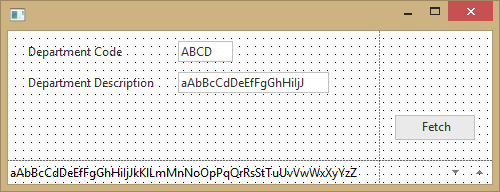
Your form should appear like this: