FRM035 - Maintain a Simple Database Table
In this step you will learn about updating and deleting based on the last record fetched instead of using the WITH_KEY parameter.
In order to use the last record read, it is important that users cannot change the key once a record has been fetched. It is equally important that a FETCH has been performed before the update or delete is requested. In order to ensure this, you need to enable and disabled fields and buttons at the appropriate times.
A new Clear button must also be added to allow the user to reset the form after a record has been fetched.
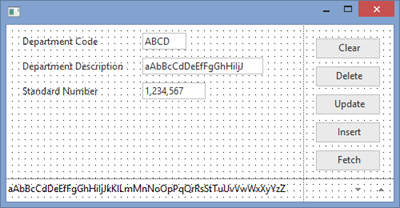
1. Drop a push button into row 1, column 2.
a. Give it a margin Bottom of 10.
b. Lengthen the form if necessary to make space.
c. Set the button Name to CLEAR and Caption to Clear.
d. Create a Click event routine for the CLEAR button.
2. Your form should appear like this:
3. To centralize your code, you will create a SUBROUTINE that can be called whenever the form needs to be reset. This subroutine needs to reset all fields to their default values and enable the Fetch and Insert buttons, as well as the DEPTMENT field. The Update and Delete buttons are disabled until a record has been fetched.
Your code should appear as follows:
SUBROUTINE NAME(INITFORM)
#FORMDATA := *DEFAULT
#UPDATE.Enabled #DELETE.Enabled := False
#DEPTMENT.Enabled #FETCH.Enabled #INSERT.Enabled := True
ENDROUTINE
4. In the CLEAR.Click event routine, execute your INITFORM subroutine.
Your finished code should appear as follows:
EVTROUTINE HANDLING(#CLEAR.Click)
EXECUTE SUBROUTINE(INITFORM)
ENDROUTINE
5. In the form's Initialize event routine, execute your INITFORM subroutine.
EVTROUTINE HANDLING(#com_owner.Initialize)
SET COM(#com_owner) CAPTION(*component_desc)
EXECUTE SUBROUTINE(INITFORM)
ENDROUTINE
6. Change the FETCH.Click event routine code so that the Department Description field, Fetch and Insert button are disabled, and the Update and Delete buttons are enabled if a record has been successfully retrieved.
Your finished code should appear something like the following:
EVTROUTINE HANDLING(#FETCH.Click)
FETCH FIELDS(#DEPTMENT #DEPTDESC) FROM_FILE(DEPTAB) WITH_KEY(#DEPTMENT)
IF_STATUS IS_NOT(*OKAY)
MESSAGE MSGTXT('Error retrieving Department')
ELSE
#DEPTMENT.Enabled #FETCH.Enabled #INSERT.Enabled := False
#UPDATE.Enabled #DELETE.Enabled := True
ENDIF
ENDROUTINE
7. Change the Click events for INSERT, UPDATE and DELETE, replacing #FORMDATA := *default with EXECUTE Subroutine(INITFORM). For example your code will now look like this:
Evtroutine Handling(#DELETE.Click)
Delete From_File(deptab)
If_Status Is(*OKAY)
Message Msgtxt('Department deleted successfully')
Execute Subroutine(INITFORM)
Else
. . . .
8. Remove the WITH_KEY parameter on the UPDATE and DELETE commands. The commands should appear simply as follows:
UPDATE FIELDS(#FORMDATA) IN_FILE(DEPTAB)
DELETE FROM_FILE(DEPTAB)
Also, after the update or delete has completed successfully, be sure to execute your INITFORMS subroutine.
FRM035 – Appendix contains a complete sample solution for form iiiMntDept.
9. Compile and execute the form.
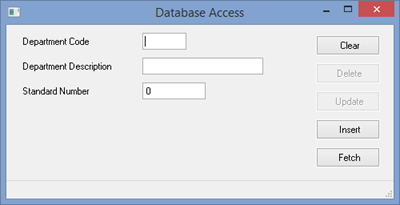
When the form first appears, only Fetch, Insert and Clear are allowed.
a. Add some new test data.
b. Fetch one of your newly inserted records.
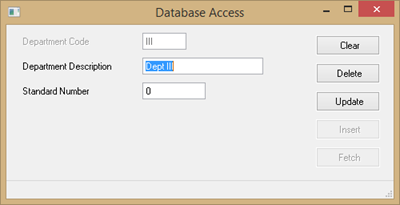
The Update and Delete buttons are now enabled while the Fetch and Insert buttons are disabled.
The Department Code is disabled to prevent the user from changing this code. You can now Update the record or Delete it. The Clear button will reset the form so that a different record can be fetched or more records inserted.
10. This step will demonstrate the LANSA Cross Update check logic.
a. Execute the form and fetch any department record, say ADM.
b. Execute a second form and fetch the same record.
c. Return to the first form and update the record.
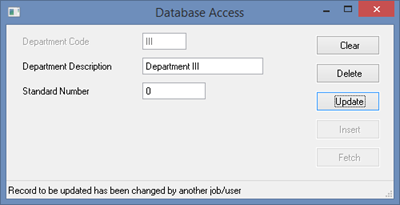
d. Now try to update the record with the second form. This will fail because of the cross update check:
11. Close your forms and close the form in the editor.