FRM075 - Using a Working List
The DEF_LIST command can be used to define two types of list:
The following defines a working list containing an unlimited number of entries, within platform limits.
Def_List Name(#emplist) Fields(#empno #surname #givename) Type(*Working) Entrys(*max)
This is the recommended way to define maximum list entries in an RDMLX enabled partition.
Note: By default a working list has an Entrys parameter of 50.
See the Technical Reference guide for further details on the DEF_LIST command.
In this step you will define a working list and use it to contain currently selected entries in the list view EMPLOYS.
1. Define a work field EMPNOKEY in your form based on field EMPNO. You will use this field to store the employee number in the working list. Your code should look like the following:
Define Field(#empnokey) Reffld(#empno)
2. Define a work field LISTCNT based on field STD_NUM. You will use this field to keep a count of the number of entries in the working list.
3. Define a working list named EMPLIST, containing fields EMPNOKEY, SURNAME, GIVENAME and SALARY. Set its maximum entries to *max, and use field LISTCNT as a counter. Your code should look like the following:
Def_List Name(#emplist) Fields(#empnokey #surname #givename #salary) Counter(#LISTCNT) Type(*Working) Entrys(*max)
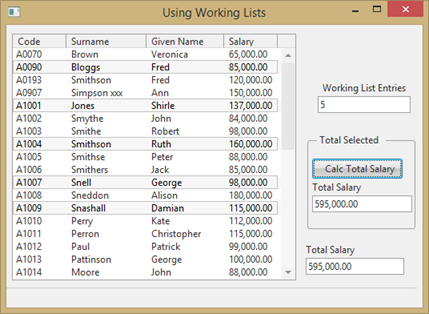
4. Drag and drop the field STD_NUM onto your form, above the 'Compute Selected' Group Box.. Change the following properties:
LabelPosition to Top
LabelHorAlignment to Left.
Caption to Working List Entries
LabelType to Caption.
5. The LOC_ENTRY locates an entry in a list, based on a Where clause, for example:
Loc_Entry In_List(#emplist) Where(#empno = #empnokey)
Extend the EMPLOYS ItemGotSelection logic to locate an entry in working list EMPLIST. If not found add an entry to working list EMPLIST. Your code should look like the following:
Evtroutine Handling(#EMPLOYS.ItemGotSelection) Options(*NOCLEARMESSAGES *NOCLEARERRORS)
#IIITOTSAL += #salary
Loc_Entry In_List(#emplist) Where(#empnokey = #empno)
If_Status Is_Not(*OKAY)
#empnokey := #empno
Add_Entry To_List(#emplist)
Endif
Endroutine
6. Extend the EMPLOYS ItemLostSelection event routine, to delete an entry from EMPLIST if an entry was located. Your code should like the following:
Evtroutine Handling(#EMPLOYS.ItemLostSelection) Options(*NOCLEARMESSAGES *NOCLEARERRORS)
#IIITOTSAL -= #salary
Loc_Entry In_List(#emplist) Where(#empnokey = #empno)
If_Status Is(*okay)
Dlt_Entry From_List(#emplist)
Endif
Endroutine
7. Add code to the COMPUTE button click event to set the form field STD_NUM to the working list count, from LISTCNT. Your code should now look like the following:
Evtroutine Handling(#COMPUTE.Click)
#iiitotsal := *zeroes
Selectlist
If (#EMPLOYS.currentItem.selected = true)
#IIITOTSAL_1 += #salary
Endif
Endselect
#STD_NUM := #LISTCNT
Endroutine
8. Compile and test your form: