FRM095 - Calling a Function
1. Create a New / Basic Form:
Name: iiiSalReview
Description: Salary Review Request.
Framework : Personnel and Payroll
RDMLX Enabled (YES)
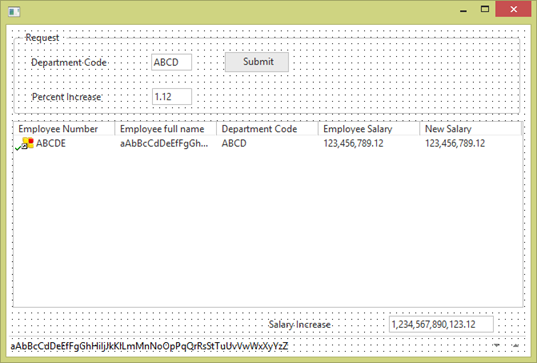
2. Design the form as follows:
Your form should look like the following:
3. Switch to the Source tab. Define four work fields:
4. Define the EMPLOYS working list.
Def_List Name(#employs) Fields(#empno #fullname #DEPTMENT #salary #iiinewsal) Counter(#listcount) Type(*working) Entrys(*max)
It is a good idea to copy the DEF_LIST definition from function iiiFN21 as it is essential that your working lists are identically defined in the calling form and the called function. If not identical, run time errors will occur. Each list must contain the same fields in the same sequence.
5. Review the following pseudo code. You will create this code in the following steps.
Use BEGINCHECK/FILECHECK/ENDCHECK to validate DEPTMENT using file DEPTAB
Clear list EMPLOYS
EXCHANGE fields DEPTMENT and iiiPERCNT
If SVRCON = N
Call, process *direct, function iiiFN21, Pass list EMPLOYS
else
USE CALL_SERVER_FUNCTION, with arguments (*sserver_ssn iiiFN21 Y *default EMPLOYS) To Get(#sstatus)
EndIf
If (#sstatus *ne OK)
Message 'Call server function failed'
End if
Clear list ListView1
CURTOT and NEWTOT = zero
Selectlist EMPLOYS
Accumulate SALARY in CURTOT
Accumulate iiiNEWSAL in NEWTOT
Add entry ListView1
End selectlist
iiiTOTSAL = NEWTOT – CURTOT
6. Begin the SUBMIT.Click event routine by using Begincheck/Endcheck and Filecheck to ensure the department code exists. Your code should look like the following:
Begincheck
Filecheck Field(#DEPTMENT) Using_File(deptab) Msgtxt('Department not found')
Endcheck
Recall that the the Endcheck error handling will branch to the Endroutine if the Filecheck raises an error.
7. Clear the working list EMPLOYS
Clr_List Name(#EMPLOYS)
8. Add an Exchange command to pass DEPTMENT and IIIPERCNT to the called function. This is termed "adding to the exchange list"
Exchange Fields(#deptment #iiipercnt)
9. The SRVCON field contains the value of the system variable *sserver_connected. The system variable is Y when connected to a server, and N when not connected to a server.
Add an If loop to call the function IIIFN21 locally when not connected.
If (#srvcon = N)
Call Process(*DIRECT) Function(iiifn21) Pass_Lst(#employs)
Endif
Note: The CALL command is passing the working list EMPLOYS to the called function, which will return it.
10. Add an Else to the If loop, which calls the function IIIFN21 on the server.
Your code should now look like the following:
If (#srvcon = N)
Call Process(*DIRECT) Function(iiifn21) Pass_Lst(#employs)
Else
Use Builtin(call_server_function) With_Args(*sserver_ssn 'iiifn21' Y *Default #employs) To_Get(#sstatus)
If (#sstatus *NE OK)
Message Msgtxt('Call server function failed')
Endif
Endif
The CALL_SERVER_FUNCTION uses the following parameters:
|
11. Complete the SUBMIT.Click event routine, with:
Your additional code should look like the following:
. . . . . .
Endif
Clr_List Named(#ListView1)
#curtot #newtot := *zeroes
Selectlist Named(#employs)
#curtot += #salary
#newtot += #iiinewsal
Add_Entry To_List(#ListView1)
Endselect
#IIITOTSAL := (#newtot - #curtot)
Endroutine
12. Compile your new form.
If required, see FRM095 Appendix B. FRM095 for a complete solution.