 Template button on the Design ribbon. Select the template VL_BASEMNT and complete the template based on the following:
FRM105 - A Trigger Function
In this step you will create a simple employee maintenance form for file PSLMST based on a template.
As noted earlier, an ideal solution for this application would be a 'Salary Change' Web Page. The email message could be generated including the employee number (EMPNO) in the URL to be passed into the Web Page when it runs from a link in the email message.
1. Create a new form iiiCOM18 – Employee Maintenance. The form should be RDMLX enabled.
2. In the Source editor, delete the default code and run a template from the Template button on the Design ribbon. Select the template VL_BASEMNT and complete the template based on the following:
|
Adjust the size of the form. Your form should look like the following:
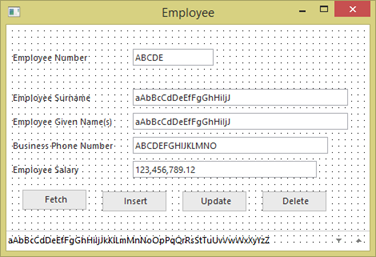
3. Compile your form.