FRM115 - Writing Reports
In this step, you will modify function iiiFN02 Section Report so that it does not request the DEPTMENT and SECTION fields. You will also enable the iiiFN02 Reporting function for Full RDMLX so that you can use the full set of RDMLX objects and features.
1. Make sure that the iiiFN02 Section Report function is opened in the editor.
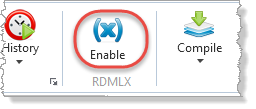
2. Choose the RDMLX Enable command on the Home ribbon, to set the function as RDMLX enabled.
Note: You cannot undo this change. Once set as Full RDMLX, the function cannot be changed back.
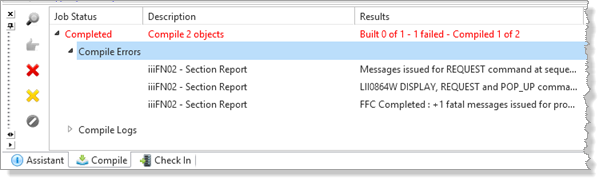
3. Try to compile the function. The function compile will fail because the REQUEST command cannot be used in an RDMLX enabled Function.
4. Delete the unneeded code in the iiFN02 function.
You can delete all of the highlighted lines:
FUNCTION OPTIONS(*DEFERWRITE *DIRECT)
OPEN USE_OPTION(*ONDEMAND)
GROUP_BY NAME(#FETCHDATA) FIELDS(#SECTION #SECDESC #SECADDR1 #DEPTMENT #DEPTDESC)
DEF_HEAD NAME(#HDR01) FIELDS(#REP1PAGE #DATE #TIME #FUNCTION #STD_TITLE #DEPTMENT
#DEPTDESC) TRIGGER_BY(*OVERFLOW #DEPTMENT) DESIGN(*DOWN)
DEF_LINE NAME(#DET01) FIELDS(#SECTION #SECDESC #SECADDR1)
CHANGE FIELD(#STD_TITLE) TO('''Section Listing By Department''')
* If this program is running online
IF COND('*JOBMODE = I')
* Request report print criteria
REQUEST FIELDS(#DEPTMENT #SECTION) DESIGN(*DOWN) IDENTIFY(*DESC)
* Submit batch run of this program
SUBMIT PROCESS(#PROCESS) FUNCTION(#FUNCTION) EXCHANGE(#DEPTMENT #SECTION)
JOB(#FUNCTION)
* Else, if this program is running in batch
ELSE
* Select required SECTAB details
SELECT FIELDS(#FETCHDATA) FROM_FILE(SECTAB) WITH_KEY(#DEPTMENT #SECTION)
NBR_KEYS(*COMPUTE) GENERIC(*YES)
* Fetch file DEPTAB details
FETCH FIELDS(#FETCHDATA) FROM_FILE(DEPTAB) WITH_KEY(#DEPTMENT) KEEP_LAST(1)
* Print the detail line
PRINT LINE(#DET01)
ENDSELECT
* Finish all printing and end program
ENDPRINT
ENDIF
You may now use assign statements and expressions in your code
FUNCTION OPTIONS(*DEFERWRITE *DIRECT)
OPEN USE_OPTION(*ONDEMAND)
GROUP_BY NAME(#FETCHDATA) FIELDS(#SECTION #SECDESC #SECADDR1 #DEPTMENT #DEPTDESC)
DEF_HEAD NAME(#HDR01) FIELDS(#REP1PAGE #DATE #TIME #FUNCTION #STD_TITLE #DEPTMENT
#DEPTDESC) TRIGGER_BY(*OVERFLOW #DEPTMENT) DESIGN(*DOWN)
DEF_LINE NAME(#DET01) FIELDS(#SECTION #SECDESC #SECADDR1)
#STD_TITLE := 'Section Listing By Department'
* Select required SECTAB details
SELECT FIELDS(#FETCHDATA) FROM_FILE(SECTAB) WITH_KEY(#DEPTMENT #SECTION)
NBR_KEYS(*COMPUTE) GENERIC(*YES)
* Fetch file DEPTAB details
FETCH FIELDS(#FETCHDATA) FROM_FILE(DEPTAB) WITH_KEY(#DEPTMENT) KEEP_LAST(1)
* Print the detail line
PRINT LINE(#DET01)
ENDSELECT
* Finish all printing and end program
ENDPRINT
Notice that the STD_TITLE has been changed to use the Full RDMLX syntax and can now use an Assign command.
5. Compile the iiiFN02 function.
6. Close the function in the editor.
7. Execute your iiiCOM19 form and generate a test report.