FRM085B - Update from a Grid Part B
LANSA V12 introduced a new field visualization option "Dynamic Picklist". This enables a simple Reusable Part component to be created which populates a picklist from a table file such the skills table (SKLTAB). This reusable part can then be attached to the dynamic picklist visualization for the skill code, such as a combo box.
This step simply illustrates a Dynamic Picklist as a solution. See the Visual LANSA Developer Guide for full details and examples, or do the Visual LANSA Frameworks Workshop.
What is a Reusable Part?
This topic is fully covered in the Visual LANSA Frameworks Workshop. For now you need to know that a reusable part is a component which either extends PRIM_PANL, meaning it is a visual panel or extends PRIM_OBJT, meaning it is a hidden component which is invoked to "do something".
1. Create a New / Reusable Part / Object:
Name: iiiVIS01
Description: Skills Picklist.
Framework: Personnel and Payroll
RDMLX Enabled : (YES)
Target Platform: Windows/IBM i/Linux
Paste the following code into it and compile it:
Function Options(*DIRECT)
Begin_Com Role(*EXTENDS #PRIM_OBJT *implements #Prim_dc.iDynamicPicklist)
Mthroutine Name(Load) Options(*redefine)
#Picklist.RemoveAll
Select Fields(*all) From_File(skltab)
#Picklist.Add( #skilcode #skildesc )
Endselect
Endroutine
End_Com
Note:
Define_Map For(*input) Class(#PRIM_PKLT) Name(#Picklist) Pass(*BY_REFERENCE)
2. Copy the field SKILCODE to create a new field iiiSKILCODE.
a. Copy rules and triggers and Help text.
b. Open the new field in the editor.
c. Select the Visualization tab.
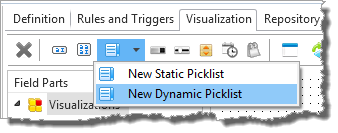
d. Insert a New Dynamic Picklist
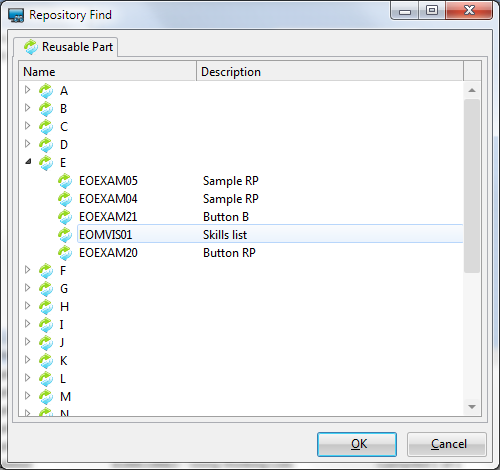
3. Select your reusable part (iiiVIS001) in the Repository Find dialog and click OK.
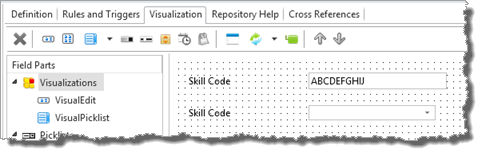
4. Select the VisualPicklist in the FieldParts list. Lengthen the combo box (which will display Skill Description) and change its DefaultVisual property to true.
5. Save and close your field definition.