Show Contents List
Step 2. Calculation Virtual Field
REP008 - Virtual Fields
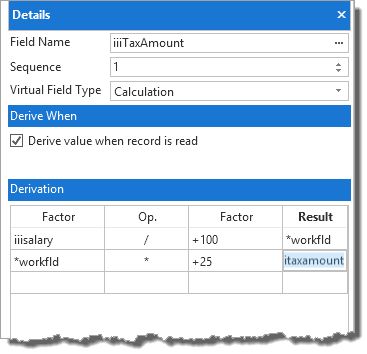
In this step you will define the iiiTaxAmount virtual field to be calculated as 25% of the iiiSalary field:
1. Select the iiiTaxAmount field in the list of Undefined virtuals.
2. In the Details tab, enter the following:
|
Virtual field type
|
Calculation
|
|
Derive value when record is read
|
ü Select option for yes
|
|
|
Factor
|
Operation
|
Factor
|
Result
|
|
iiiSalary
|
/
|
100
|
*WORKFLD
|
|
*WORKFLD
|
*
|
25
|
iiiTaxAmount
|
|
Note:
- The *WORKnnnnn fields are exclusively reserved for use in "virtual" code extended definition "mathematical calculations" only.
- The *WORKnnnnn fields do not have to be defined within LANSA, the *WORKnnnnn field length will be automatically assumed to be 30,9.
- All *WORKnnnnn fields that are used in a "mathematical calculation" are automatically initialised before the first time they are used.
- Multiple *WORKnnnnn fields can be used in "mathematical calculations" simply by replacing the "nnnnn" portion of the work field name with a unique replacement value, for example: *WORK00001, *WORK00002, *WORKTOT01 etc.
- If *WORKnnnnn fields with the same name are used in other virtual field "mathematical calculations" their values will not be carried forward to the next virtual field's mathematical calculation.They are Display-only fields.
Your Details tab should now look like this:
Note:
- Calculation Virtual Fields can only be calculated when a record is read.
- They are Display-only fields.
3. Now that its derivation has been defined, the iiiTaxAmount field will be listed under Read virtuals.

Show Contents List