REP010 - Access Routes and PJFs
In this step you will add a PJF for the Department Description field from the iiiDepartments Department file to the iiiEmployees Employee file. By defining a PJF (Predetermined Join Field) in the file, you can access the Department Description each time the Employee file is accessed without writing extra code to access the Department file. This field will appear as if it is simply part of the Employee file, and will be retrieved by the OAM.
1. The file iiiEmployees should be open in the Editor and selected.
2. Ensure that the Fields in File tab is visible. Notice that no PJFs have been defined.
3. Select the Access Routes tab to add your new predetermined join fields.
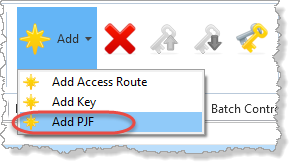
4. Select the IIITODEPT access route. Use the Add button on the Home ribbon, and select Add PJF from the menu.
5. Complete the Details tab, by enter the following characteristics:
|
Use the ellipsis button and Find dialog to select each field.
Your Details tab will now look like this:
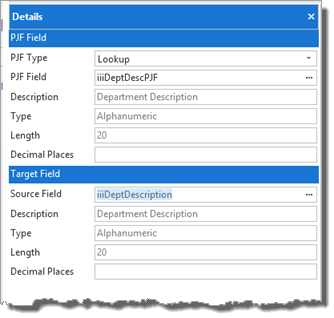
The value of the iiiDeptDescription from the Department file will now be retrieved and returned to a LANSA program as the field iiiDeptDescPJF in the Employee file.
Note: Predetermined Join Fields are display only fields.
Your access route should now appear like this:
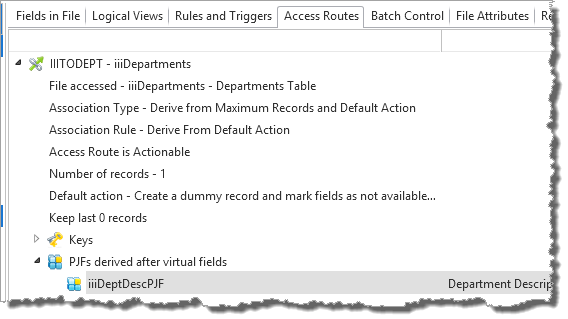
6. Select the Fields in File tab. Your field list should now appear like this:
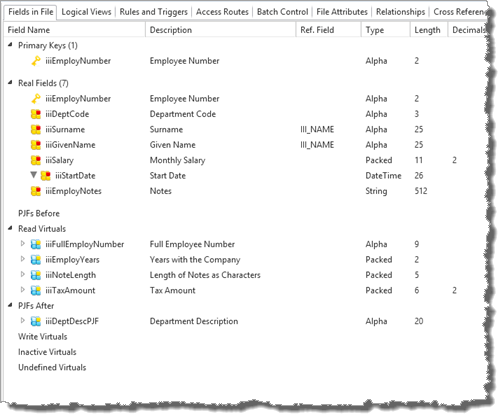
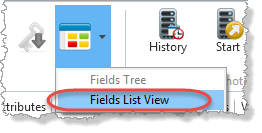
7. Select the Select View Style button and change the display to Fields List View to get a different overview of your file:
Your Fields in File tab will now look like this:
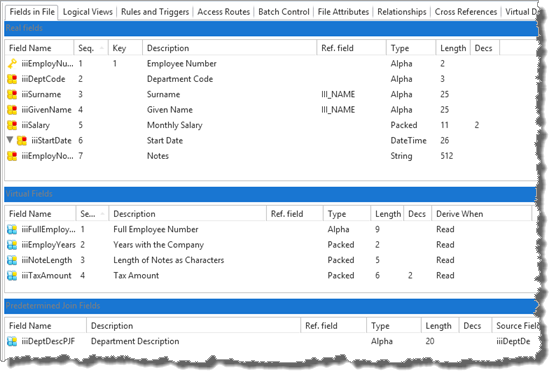
8. Click the iiiDeptDescPJF field. Notice that it is possible to edit the PJF definition from the Fields in File tab.
9. Compile the file and close it. Remember you just need to rebuild the OAM. If you click Compile it will use the options selected for the last compile.