1. From the File menu, create a New / Basic Form:
Name:iiiMultilingualTest.
Description: Multilingual Test
Framework: Personnel & Payroll
RDMLX Enabled: (YES)
2. Replace all your code with the following:
Function Options(*DIRECT)
Begin_Com Role(*EXTENDS #PRIM_FORM) Clientheight(324) Clientwidth(396) Height(363) Left(612) Top(205) Width(412)
Define_Com Class(#PRIM_TAB) Name(#TAB_1) Bottomlayoutpriority(4) Componentversion(1) Displayposition(1) Height(241) Left(8) Leftlayoutpriority(1) Parent(#COM_OWNER) Rightlayoutpriority(2) Tabposition(1) Top(8) Toplayoutpriority(3) Width(369)
Define_Com Class(#PRIM_STBR) Name(#STBR_1) Displayposition(2) Height(24) Left(0) Messageposition(1) Parent(#COM_OWNER) Tabposition(2) Tabstop(False) Top(300) Width(396)
Define_Com Class(#PRIM_PHBN) Name(#FIND) Displayposition(3) Left(16) Parent(#COM_OWNER) Tabposition(3) Top(264) Caption(*MTXTIIIFIND)
Define_Com Class(#PRIM_TBSH) Name(#TBSH_1) Displayposition(1) Height(217) Left(0) Parent(#TAB_1) Tabposition(2) Top(24) Width(369) Caption(*MTXTIIIDETAILS)
Define_Com Class(#PRIM_TBSH) Name(#TBSH_2) Displayposition(2) Height(217) Left(0) Parent(#TAB_1) Tabposition(1) Top(24) Width(369) Caption(*MTXTIIIADDRESS)
Define_Com Class(#SURNAME.Visual) Name(#SURNAME) Displayposition(1) Left(16) Parent(#TBSH_1) Tabposition(1) Top(51) Width(321)
Define_Com Class(#GIVENAME.Visual) Name(#GIVENAME) Caption(*MTXTIIIDETAILS) Displayposition(2) Left(19) Parent(#TBSH_1) Tabposition(2) Top(86) Width(326)
Define_Com Class(#ADDRESS1.Visual) Name(#ADDRESS1) Componentversion(1) Displayposition(1) Height(21) Parent(#TBSH_2) Tabposition(1) Top(21) Usepicklist(False) Width(350)
Define_Com Class(#ADDRESS2.Visual) Name(#ADDRESS2) Componentversion(1) Displayposition(2) Height(21) Parent(#TBSH_2) Tabposition(2) Top(43) Usepicklist(False) Width(350)
Define_Com Class(#ADDRESS3.Visual) Name(#ADDRESS3) Componentversion(1) Displayposition(3) Height(21) Parent(#TBSH_2) Tabposition(3) Top(65) Usepicklist(False) Width(350)
Define_Com Class(#POSTCODE.Visual) Name(#POSTCODE) Componentversion(1) Displayposition(4) Height(21) Parent(#TBSH_2) Tabposition(4) Top(87) Usepicklist(False) Width(249)
Define_Com Class(#EMPNO.Visual) Name(#EMPNO) Componentversion(1) Displayposition(3) Height(21) Left(19) Parent(#TBSH_1) Tabposition(3) Top(21) Usepicklist(False) Width(251)
Evtroutine Handling(#com_owner.Initialize)
Set Com(#com_owner) Caption(*component_desc)
Endroutine
Evtroutine Handling(#FIND.Click)
Fetch Fields(*all) From_File(PSLMST) With_Key(#empno)
Endroutine
End_Com
3. Save your form.
4. Switch to the Design tab.
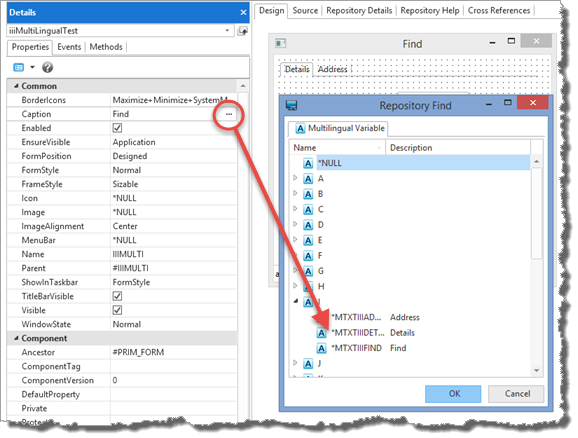
a. Select the push button. On the Details tab changes its Caption to *MTXTiiiFIND, by selecting it using the ellipsis button and Repository Find dialog. Remember your multilingual variable name begins III, where III is your initials.
b. Select the first Tab Sheet (contains Employee Number). Click first on the tab, and then in the middle of the sheet to select it.
c. Select the second Tab Sheet (contains Address Line 1) and set its Caption to *MTXTiiiADDRESS.
5.Compile the form.
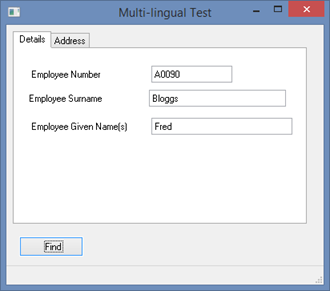
6. Execute form iiiMultiLingualTest from the development environment. This is running the form using the English language and it should look like the following:
7. From the LANSA program folder, double click the Execute Form icon , or select LANSA / Exec Form from the Windows start menu.
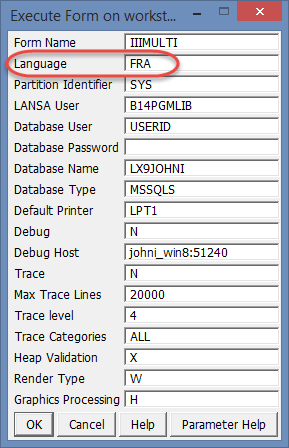
Change the Language to FRA for the French language. Since you have just executed the form from the development environment, the Form Name in this dialog will already contain the Identifier for your iiiMultilingualTest form.
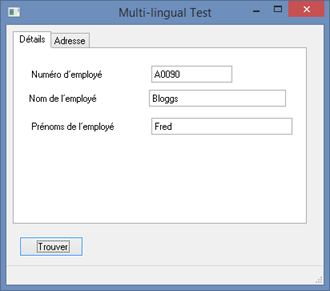
8. Click OK to execute the form and retrieve an employee record.
Note: