Show Contents List - Composer Version 6.1
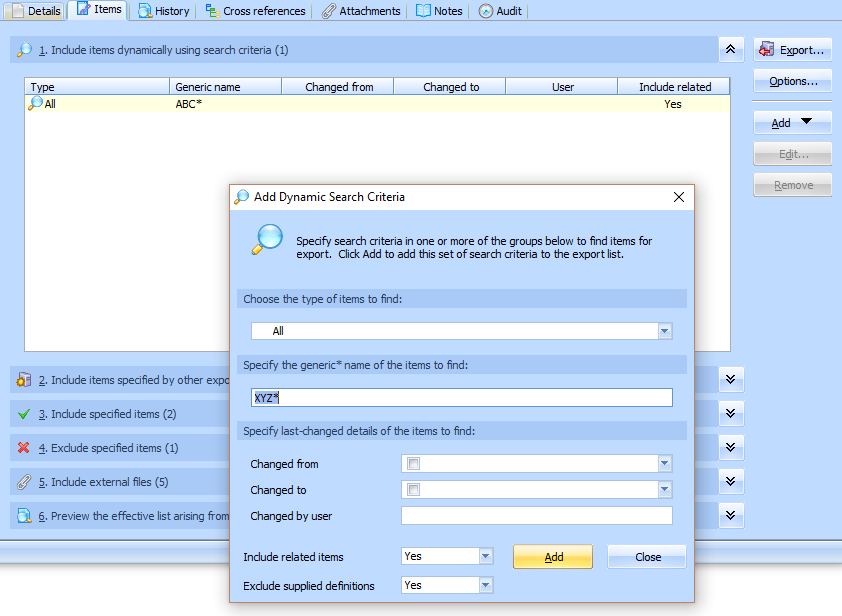
You can include items in the export dynamically using search criteria. You can specify any number of sets of search criteria and each set may include tests for one or more of the following:
In any one set of search criteria (that is, one line in the list), all the specified tests must be satisfied for an item to be included in the export. Each set (line), however, is evaluated independently of the others.
To add search criteria, click the Add button and select the Add search criteria command from the menu. Then complete the details in the Add Dynamic Search Criteria window and click Add.
To edit an existing set of search criteria, select it in the list and click Edit. To remove an existing set of search criteria, select it and click Remove.
Include related items
For each set of search criteria, you can also specify whether the export should include related items for the items that are selected for that set. You can choose from the following:
No: related items are not automatically included in the export.
Yes: immediately related items are automatically included in the export only for the items that are selected by the search criteria.
Recursively: related items are automatically included in the export for the items that are selected by the search criteria and for those related items and any further related items. (LANSA Composer will automatically prevent infinite recursion arising from circular references.)
'Related items' means the set of items that are used by a given item. For example, for a Processing Sequence, it might include event handlers, configurations and other items used by the Processing Sequence. For any given item, you can see what will be considered 'related items' by displaying the Used by section of the Cross references for the item.
Note that supplied definitions (items that are supplied with LANSA Composer such as all the shipped Activities) are not included by any of the Include related items options. This means, for example, that Activities that are used by a Processing Sequence are excluded unless they are custom activities that you have defined yourself. This is typically the desired behaviour.
Exclude supplied definitions
For each set of search criteria, you can also specify whether the export should exclude supplied definitions.
Supplied definitions comprise certain definitions that are supplied and installed with LANSA Composer, such as all the shipped Activities.
The default for this option is Yes, meaning that supplied definitions ARE excluded. This is typically the desired behaviour. You should not have any need to export supplied definitions and they should not normally be imported to a target system other than as part of the standard LANSA Composer installation.