Show Contents List - Composer Version 6.1
Many LANSA Composer solutions rely on files that are external to LANSA Composer's database – such as XML schema files, body text files for SMTP Mail Details configurations, skeleton text files for use with the TEXT_SUBSTITUTE activity and many other file types.
You can include such files in your export providing they are held in the Home path relative to server specified in System Settings or a"child" directory of that location.
When you include such files, LANSA Composer stores the relative path in the export file and, on import, it reconstructs the file path relative to the corresponding system setting in the target system. In addition, the import will, if necessary, create the sub-directory paths on the target system on import.
You can choose any number of external files to include. However, you should be aware that including many files and/or large files will substantially increase the size of the export file, as well as the time necessary to export and import them. If you have many and/or large files to deploy, you should consider (a) zipping them and including the zipped file, or (b) deploying them by other means.
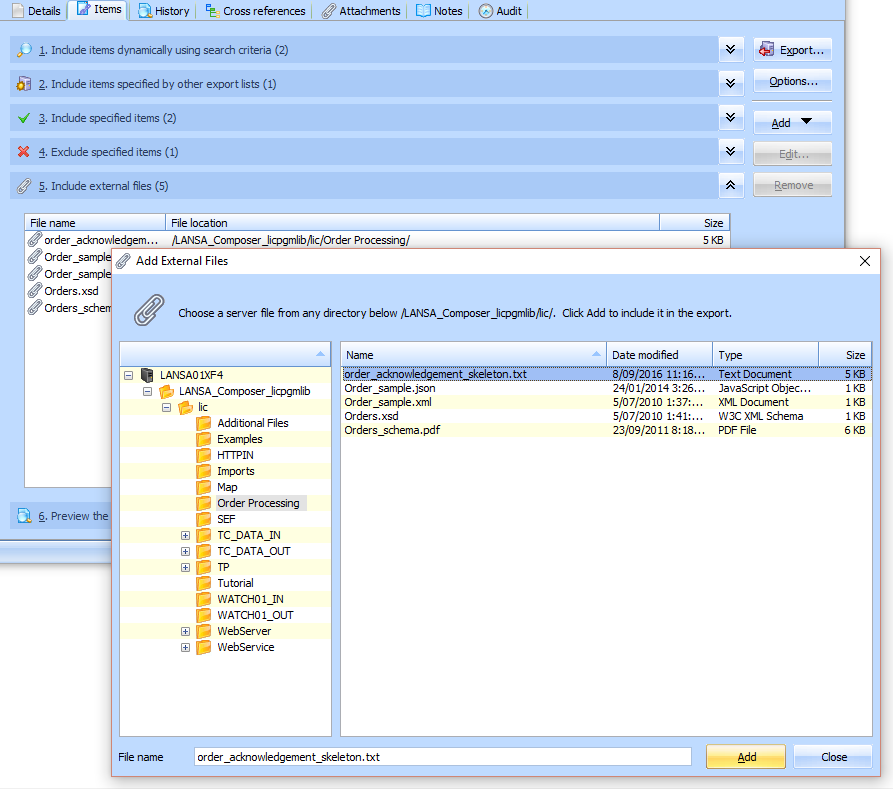
To include an external file in your Export List, click the Add button and select the Add external files to include command from the menu. Then locate and select the required file in the Add External Files window and click Add.
To remove an included external file, select it and click Remove.