Show Contents List - Composer Version 6.1
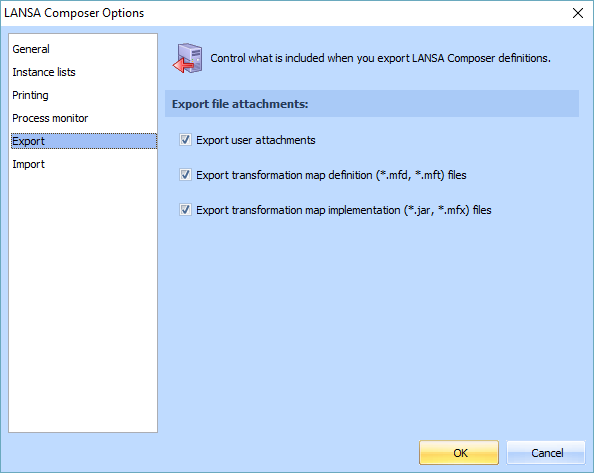
You can display the Export and Import Options by clicking the Options button either while working with an Export List or while creating an impromptu export.
The Export and Import Options affect what is included when you export or import items and the behaviours for import with respect to some existing items and values.
Each of the options is further described below:
Export user attachments
This option controls whether user attachments to items in the export are included in the export data. If you do not include the user attachments, then they will not be imported on the target system.
In most cases this option should be checked. However, user attachments can considerably increase the size of the export data and the time required to export and import the items. For more information about user attachments, refer to the discussion of attachments in Working with Definition Items.
Export transformation map definition (*.mfd, *.mft) files
The Transformation Map definition files are the .mfd files that contain the mapping definitions of your Transformation Maps. This option controls whether they are included in the export data when exporting Transformation Maps.
Without the map definition files you will be unable to open the Transformation Maps in the mapping tool for review or edit. Nor will you be able to Prepare the Transformation Maps. Having said that, the Transformation Map definitions (.mfd files) are not required at run-time and you may choose not to deploy them to a production run-time environment. In most cases, however, we recommend that this option is checked.
Export transformation map implementation (*.jar) files
The Transformation Map implementation files are the executable .jar files that result from successfully preparing Transformation Maps. This option controls whether they are included in the export data when exporting Transformation Maps.
Normally you should deploy these files, since the affected Transformation Maps cannot be executed without them. In most cases this option should be checked.
Note: Including the Transformation Map executable files (the .jar files) in an export will very considerably increase the size of the export file and the time required to export and import the items. For easiest handling and to avoid exceeding system limits, you may need to modularize or separate the export of individual Transformation Maps or groups of Transformation Maps to allow for this.
Import will preserve values of existing system properties
LANSA Composer's System Properties can consist of the definition of a system property and the system property's value. When deploying a System Property, you usually want to deploy its definition, but if the System Property is already present on the target system, you probably do not want its value to be replaced.
This option specifies that behaviour. If you uncheck this option, then an import of a System Property will replace both the definition and the value on the importing system.
For more information, refer to System Properties.
Import will preserve existing user and password security credentials
Several types of LANSA Composer configurations include security credentials. For example, an FTP configuration can contain a user name and password necessary to connect to the remote FTP server.
When you operate separate 'design' and 'production' environments, the security credentials used in each will often be different. Therefore when deploying updates to configurations, you typically do not want the security credentials from the 'design' environment to be deployed to the 'production' environment, replacing the existing credentials in that system.
If selected, this option specifies that when importing configurations containing security credentials, if a configuration already exists in the target system, the existing user and password security credentials will not be replaced with those contained in the export data. We recommend that this option is checked in most circumstances.
For more information, refer to Security Credentials for Transport and Other Configurations.
NOTE: irrespective of this setting, LANSA Composer does not export or import passwords associated with security credentials contained in transport and other configurations. If this option is not checked, this means that you must manually change the configuration on the target system after importing it, to specify the password that applies on that system.
Import user attachments
This option controls whether user attachments to items (if present in the export data) are imported.
In most cases this option should be checked. For more information about user attachments, refer to the discussion of attachments in Working with Definition Items.
Import transformation map definition (*.mfd, *.mft) files
The Transformation Map definition files are the .mfd files that contain the mapping definitions of your Transformation Maps. This option controls whether they are imported (if present in the export data) when importing Transformation Maps.
Without the map definition files you will be unable to open the Transformation Maps in the mapping tool for review or edit. Nor will you be able to Prepare the Transformation Maps. Having said that, the Transformation Map definitions (.mfd files) are not required at run-time and you may choose not to deploy them to a production run-time environment. In most cases, however, we recommend that this option is checked.
Import transformation map implementation (*.jar) files
The Transformation Map implementation files are the executable .jar files that result from successfully preparing Transformation Maps. This option controls whether they are imported (if present in the export data) when importing Transformation Maps.
Normally you should deploy these files, since the affected Transformation Maps cannot be executed without them. In most cases this option should be checked.
Create linked directories if they do not exist
This option applies to the import of Trading Partner definitions, and specifically the Linked Directories defined for a Trading Partner. If this option is checked, then LANSA Composer will attempt to create the directories in each linked directory path on the target system. In most cases this option should be checked.