 Version 7.0
LIC008 - Processing via Email
1. Use Windows Explorer to display the folder:
\\<iSeries>\LANSA_Composer_LICPGMLIB\LIC\Tutorial\
Where:
<iSeries> = the training IBM i domain name
LICPGMLIB = the name of the LANSA Composer program library
LIC = the name of the LANSA partition which Composer is using
Your folder should look like the following:
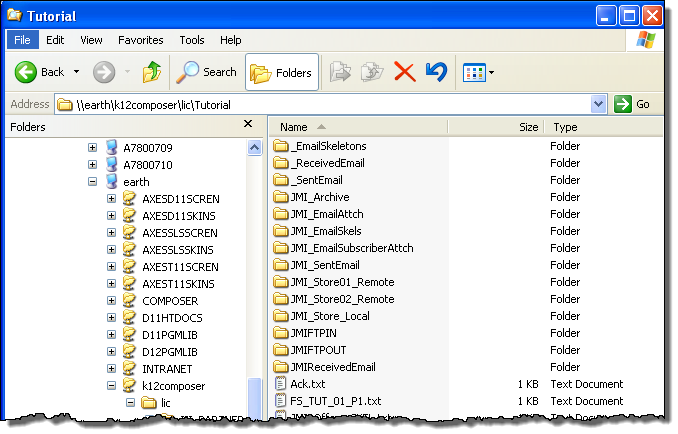
Note: the path shown in Windows will depend on the File Shares defined for the IBM i server. In the above example, the share \\earth\k12composer, maps to \\earth\lansa_composer_k12pgmlib.
2. In this exercise you will use these folders:
If these folders do not already exist, create them.
3. You will also need to create folder \iii_ReceivedEmail, using your initials. It will be used to save the email message received via POP3.
 Version 7.0