These exercises introduce you to the capabilities of the VISUAL LANSA Framework. The first two exercises are common to all Visual LANSA Framework users. With the final four exercises, you will branch into either Web (VLF-ONE) or Windows (VLF-WIN) development.
Please note that the Visual LANSA Framework Guide contains more VLF Tutorials.
With the Web Page or Windows specific development you will start implementing real filters and command handlers, so you need to know how the data you will be using is stored.
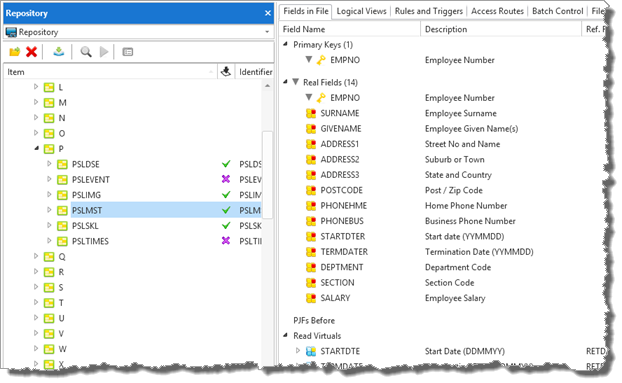
The Web Page and Windows exercises are based on the Personnel file, PSLMST which is part of the shipped Demonstration material. Locate this file in the repository and view its properties. You can also see the layout of these files in the Appendix of theses course notes.
An example of the Personnel System File, also referred to as the Employee file:
Prerequisites
This course requires LANSA Version 14 (Build 4120) and Visual Frameworks EPC140010 or later.
To complete this module you must use a partition with Demonstration Material and Visual Framework installed:
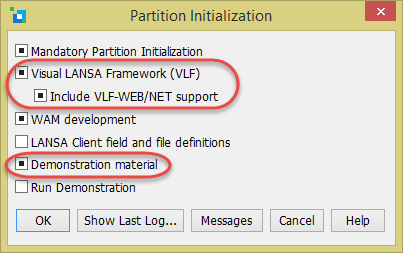
This dialog is accessed from the Partition Initialization button on the Visual LANSA logon form.
Note: In the above dialog, when the check boxes are pre-filled with a square box, the imports have already been performed.