These instructions describe how to setup a new VCS from a LANSA Repository. If you already have LANSA in a VCS, then go to 4.2.5 Setting up 2nd and Subsequent Developers to use a VCS Master for Git in the Cloud.
Populate VCS Working Folder
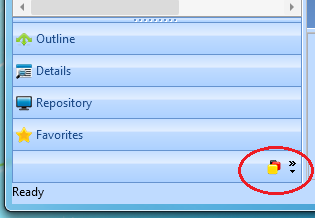
1. Once the Development Environment is displayed, show the Version Control tab by clicking on this icon:
2. Right click on the Active Partition and click Populate Working Folder in the context menu.
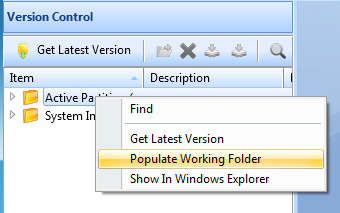
3. Click OK on the resulting dialog.
All the objects in the repository will be saved into the VCS Working Folder. This can take quite a while for a large partition and it must complete, although it can be stopped and restarted if required. It will continue from where it left off.
4. Repeat for the System Information. This is usually much quicker.
Pointing the Version Control System at the LANSA VCS Working Folder
Now you need to point the VCS at the LANSA VCS Working Folder. How you perform this step will depend on your Version Control System. The example used here is Git. The use of this as an example is not an endorsement that this particular VCS will suit your development and management style.
1. Go to the LANSA Development Environment and on the VCS tab, click on the Active Partition and choose Show in Windows Explorer. Navigate up one level to the VersionControl directory and then copy the whole of the path.
2. You must now initialize a Git repository in this directory. There are various ways to do this.
One way is to use Git Extensions.
a. Open Git Extensions and on the first screen click Create New Repository.
b. Paste the directory into this dialog and click Create. (Note that if this is the first time you have run Git it will show you a list of global settings which must all be setup correctly before proceeding.)
3. You should see the Commit button on the toolbar with a tick in a red circle indicating there are changes to commit to Git. Click on Commit to show the Commit dialog. Stage all the changes and click Commit.
LANSA and the VCS are now linked together.