Show Contents List - Composer Version 6.1
LANSA Composer supports creating and using Export Lists that identify a set of items to be exported. By defining an Export List you can reliably repeat the same deployment operation over time or for different targets. You can create, maintain, and delete any number of Export Lists according to your solutions' needs.
An Export List can also include other Export Lists. When such a list is exported, LANSA Composer will explode the list (disregarding any circular references) and export the super-set of definitions specified by all the referenced export lists.
To work with Export Lists, expand Deployment in the Navigator and click Export lists. To find out how to locate and select Export Lists to work with, refer to:
Locating and selecting items in the Instance Lists
For information on common tasks associated with Export Lists (such as creating, copying, deleting and printing definitions) refer to:
For information on tasks associated specifically with Export Lists, refer to the following headings:
Select Items to be Included in an Export List
Select Items to be Included in an Export List
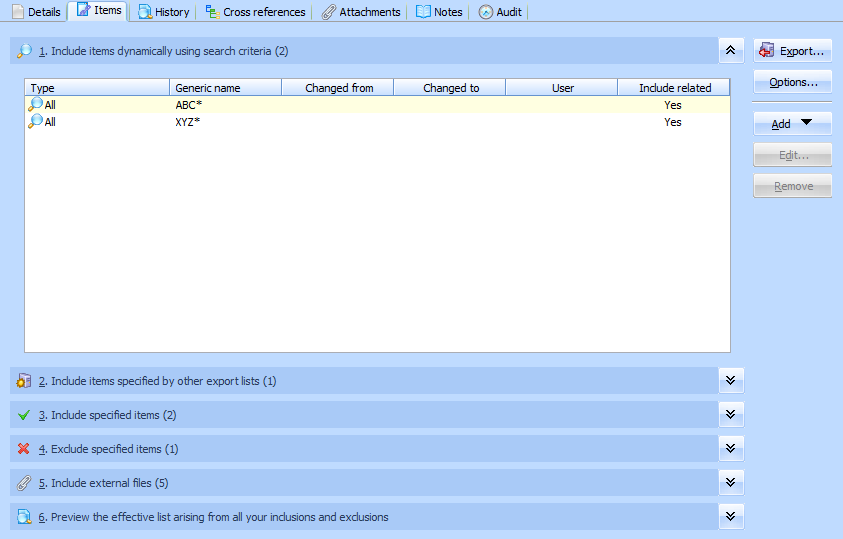
To review or change the LANSA Composer definitions included in an Export list, select the required Export List in the instance list and then click the Items tab.
On the Items tab, you can specify search criteria and select specific items to be included in or excluded from the Export List in one or more of the six sections shown. This is done in the same way as when you 6.2.2 Create an Impromptu Export. For more information, refer to: